
Device Simulator for Customer Support
Design project lead, product/UX design, user research, SaaS and internal tooling, AI & automation design, 2023-2025
Call agents who provide device support often have no access to the actual physical device. They guide customers based on experience and guesswork. The Simulator enables the call agents to “see what the customer sees” with an interactive virtual device. The Simulator is designed together with the Simulator Editor, where the Simulator content is created.
Role: Design project lead, Designer, Researcher
Note: Due to confidentiality purposes, limited and altered interfaces are shown.
Project Context
Customer support is an important part of the brand experience. As products become more advanced, interactive, and complex, the demand for immersive device support tools is rising, replacing traditional knowledge bases. Call agents’ ultimate goal is to provide fast and satisfying support for the customers, and the Simulator empowers them to do so by enabling them to “see what the customer sees.”

Project Goal
The Device Simulator helps call agents to better support the customers with a realistic device simulator to mimic the customer’s situation. This is especially valuable for remote agents who lack access to physical hardware. The Simulator’s content is created by our internal team using the Simulator Editor. Both tools used to be outdated and were not designed for scale. As client demands and product complexity grow, they need a series of major upgrades to support more features, content, and efficient workflows.

Leading Product and Market Growth
In preparation and response to growing product complexity and evolving business needs, I led the strategic design and rollout of key features that expanded the Device Simulator’s value and reach. Each feature was crafted to directly improve agent efficiency, support accuracy, and market scalability. This progression not only strengthened the core support experience but also prepared the Simulator for expansion into complex product markets and new audiences, reinforcing its role as an essential tool for both frontline support and organizational growth.

Leading Innovation and Continuous Discovery & Research
To drive continuous innovation, it is important to build continuous discovery into the team’s workflow—using the right research methods for the right context. By exploring new technologies like AI and automation, and staying closely connected with users and stakeholders, design can take a leading role in shaping strategy and direction. This approach helps align the team, uncover new opportunities, and deliver solutions that are both creative and practical.

Process
The goal was to design a scalable, future-proof product that supports business growth and expansion into new markets. The Simulator and its Editor were designed in parallel, ensuring they evolved together. Multiple levels of design were developed simultaneously—balancing quick implementation with radical innovation. All this while avoiding abrupt disruption to existing workflows in areas where they’ve developed “muscle memory” and work efficiently.

Impact on Call Agents' User Journey
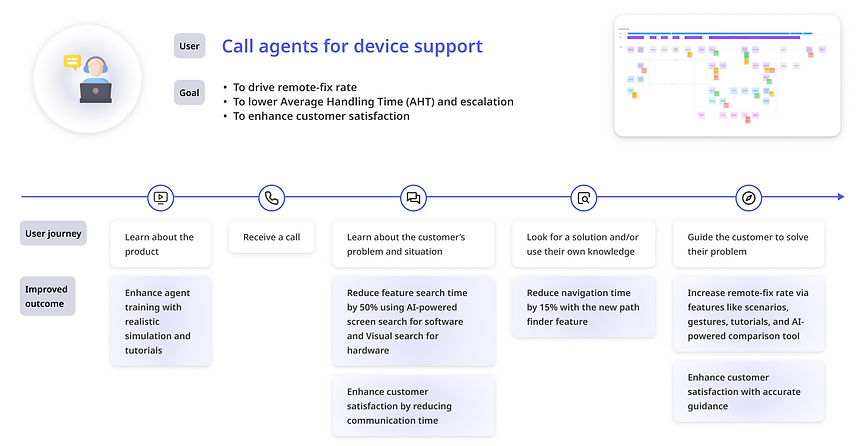
From a business impact perspective, the Simulator helps clients achieve key performance goals: increasing remote-fix rates, reducing Average Handling Time (AHT), and boosting customer satisfaction. For call agents, it enhances efficiency, confidence, and product knowledge—improving every touchpoint from training to problem diagnosis and customer guidance.
Impact on Content Producers' User Journey
The Simulator Editor is an internal product used by the content production team. From a business impact perspective, the new Simulator Editor reduces content production time and prepares for future innovations of the Simulator. For content producers, it provides an intuitive and smooth experience that addresses each of their particular needs and empowers them to focus on tasks that require more expertise, which they enjoy more.

Simulator - Realistic Virtual Device Tailored for Customer Support
The Simulator underwent multiple stages of innovation—introducing new features, improving the UI, expanding use scenarios, and supporting entry into new markets, all to meet growing user and business demands.

Simulator Innovation - Higher Efficiency Driven by AI
-
Screen Search: Call agents need to locate a certain screen, app, or setting from hundreds of screens. The Screen Search is powered by AI and serves as a shortcut to increase efficiency.
-
Path Finder: Call agents sometimes do not know how to land on a particular screen or setting. The Path Finder shows the call agent how to get to that screen.

Simulator Innovation - New Products, New Markets
-
Configurable simulators: New markets include advanced hardwares, connected device systems, electric cars, etc. The Simulator should be flexible enough to be tailored to each type of product.
-
Multi-interface simulation: Many products have multiple interfaces for the user to interact with, including the combination of several software and hardware, such as video game consoles and electric cars.
-
Feature explanations: By introducing feature explanations, the user is able to not only mimic the customer’s situation using the Simulator, but also gain in-depth knowledge about the hardware/software of the device, which is especially helpful during training.

Simulator Innovation - More Realistic, More Interactive
-
Gesture guidance: Enabling the call agent to perform different types of gestures on the simulator can make their experience and explanations more realistic and accurate. However, this additional process cannot decrease their efficiency.
-
Feature highlights: For newly launched devices, the interactive feature highlights are helpful for guiding call agents in virtual training. This can be extended to customer-facing websites as a “virtual tryout” experience.

Simulator Editor: Internal Tool for Efficient Simulator Content Production
The Simulator Editor underwent a major revamp on every level—spanning from macro to micro design. This included system and information architecture, design system reconstruction, automation workflows, and multiple sub-feature designs.

Editor Innovation - Streamlined Simulator Content Production Workflow
The content producers’ initial workflow was examined and broken down into detailed tasks. By speeding up, combining, and automating the tasks while maintaining the producers’ mental logic, the Simulator Editor underwent a complete redesign to streamline the simulator production workflow and eliminate unnecessary dependencies on other teams such as developers.
Users were closely involved in concept validation to ensure the redesign delivered major improvements without introducing unfamiliarity or friction.

Editor Innovation - Intuitive and Modular Controls
The Simulator Editor introduced a set of intuitive, modular controls that made creating and updating simulators faster and more flexible. They also ensured that the Editor can keep up with the continuous evolution of the front-end Simulators in response to expansion into new product markets.

Editor Innovation - AI-powered Automation with Smooth UX
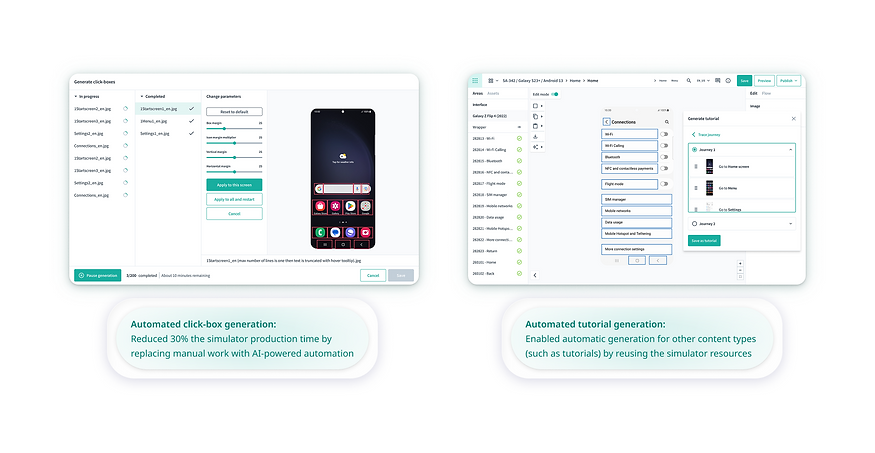
A big part of content producers’ repetitive work is to apply click-boxes to the virtual device and connect them to the target screen. Technologies such as image and text recognition combined with automation can help replace a big part of the manual work. While this feature is technology-driven, UX is crucial in smoothly integrating this new process into the content producers’ workflow, reducing their feeling of vulnerability and ensuring their control.
Editor Innovation - Design System Renewed for Accessibility Compliance
A new design system was built with accessibility at its core—ensuring compliance with standards like WCAG while improving usability, consistency, and scalability across components. This end-to-end system reconstruction requires the ability to design, structure, and implement a robust foundation for product growth.

Additional Feature: AI-Powered Device Comparison Tool
Call agents sometimes receive sales-related calls aside from device support. The AI-powered device comparison helps these agents to easily compare the specifications of different devices and translate technical jargons into a language customers can easily understand.
